
Following the recent public release of Web Gemini from the LINX rail traffic system, the Rail Record live train times website now shows these train consists.
Rail Record already shows C2C passenger service allocations for the most part, thanks to the train operator’s interests in sharing their data.
The allocations shared via Web Gemini interface include operators covering most of the country including:
- Avanti West Coast
- C2C (As Before)
- Chiltern
- Crosscountry
- Crossrail Elizabeth Line
- Gatwick Express
- Greater Anglia
- GWR
- LNER
- Merseyrail
- Northern
- Thameslink / Great Northern
- Transport for Wales
- Southern
- South Western Railway
- West Midlands Trains
Train allocations were made possible thanks to organisation by Network Rail, Rail Delivery Group and Opentraintimes.
How To See Passenger Train Allocations
Rail Record makes the unit numbers available in several ways. You can either search by unit number to see a full list of workings by that unit, or you can set the site to show full unit numbers on search results pages.
Train schedule timetables show the unit numbers as well
1. Train Allocations on Timetables
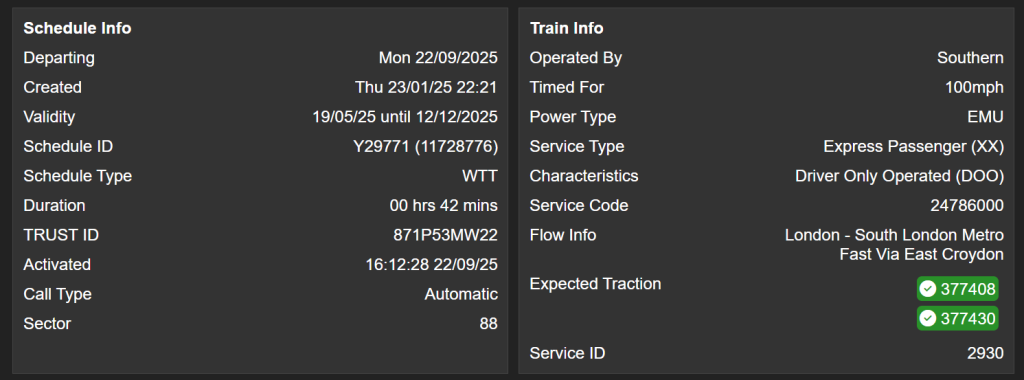
You can see which train unit is allocated to your service according to the units assigned on the timetable points, see below. A green + background indicates “unit on”, while a red minus indicates “unit off”, in places where the train splits / divides.


Meanwhile the full booked units allocated to a service, as usual, can be found in the “Expected Traction” field at the bottom of schedules. They are highlighted in green, and show every unit on that service regardless of whether it joins later in the timetable.
2. Train Allocations on Search Results
Using the Spanner icon on the main menu, its possible to change what you see on your location search results.
- By default, you’ll see a Tick Circle with the number of individual units on the service.
You can change the preferences to show:
- One Unit’s Full Number, and a Plus Icon showing the number of other units.
- Full List of Unit Numbers
Examples of these are shown below:
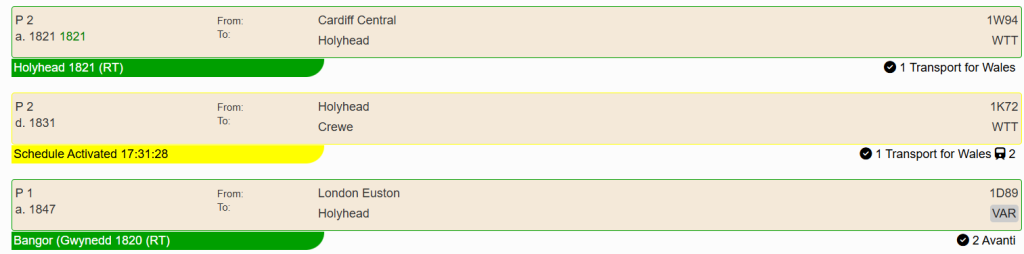
Default Preference: Shows Unit Count
Black tick indicates number of individual units, while the train icon shows number of coaches.
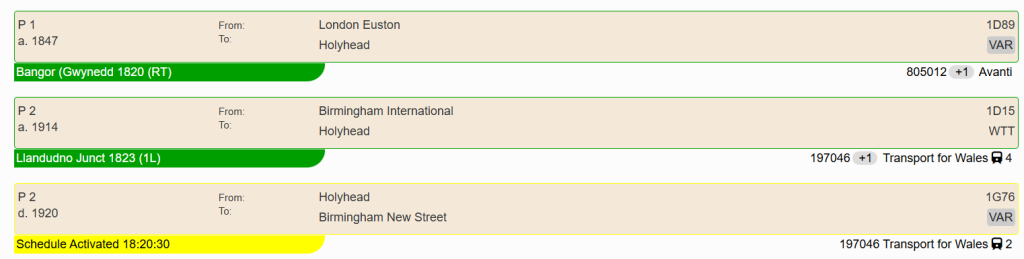
Preferences to set: Show Allocation Numbers
Shows one unit number, and a +Count for number of other units that will be in the formation. This does not reflect joins/divides so may be inaccurate.
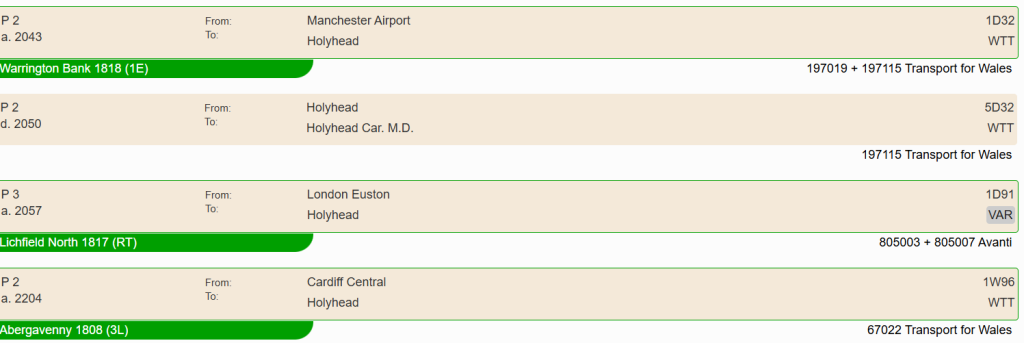
Preferences to set: Show Allocation Numbers, Show Every Allocation
This does not take into account joins/divides, so if a train divides en-route, it will show every unit on the working.
Filter Allocations on Results Page
We have enhanced the Results Filters box (enabled via the Preferences page) so you can now filter through a days list for specific units.
For example if you only want to show class 455s at Guildford, select Allocation from the dropdown and start typing 455.
Attached Example shows using the Result Filters to only show Class 455s at London Waterloo, other services get hidden. Note in this below example, I have Show Allocation Numbers and Show Every Allocation Numnber switched on in Preferences.

What Else Has Changed?
All of the services where C2C allocations were showing, should now support these new operators. That includes:
- Allocation Alerts [Member Area] – Get emails when your alert trigger unit or locomotive gets a Gemini/TOC assignment to schedule.
- Unit Pages [Member Area] – The member area shows system reports and you can see historic workings for units.
Over the next few months, gradual improvements to the service will be made. Please look forward to these changes.
Thanks For Your Support
Thankyou for using the Rail Record website and I hope these new features help you.
Disclaimer: Rail Record offers no guarantee of uptime for allocations and these are uploaded to rail systems at the operator’s efforts. Nor does Rail Record guarantee the accuracy of information shown.
Pingback: What’s Included in a Rail Record Membership? – Rail Record Blog