

Request Train Unit Allocations By Email, Whatsapp or Text
You may find it quicker to look up units by using our allocation search page. Find it here.
Rail Record members can now request allocations for supported rolling stock by sending an email or message to the website. Useful for fast response without having to login to your browser, you can now request allocations by the following methods:
- Email: By sending a request to units@gen.rail-record.co.uk
- SMS: Perfect if you’re out without a data connection. Send a text containing the unit number to 07380695001.
- Whatsapp: By sending a request to 07870219640
A member area account is required for SMS and Whatsapp requests, a paid service. These mobile numbers are not monitored and respond only to allocation requests.
A Simple Way to Get a List of Workings For Today
This service compliments the existing Rail Record allocation alerts, where you can set email alerts to be notified every time your requested unit or Gemini-alloxed locomotive receives an allocation.
To set up automated allocation email alerts when a particular unit or Gemini-alloxed locomotive is assigned, go to:
- Member Area > Alerts > Allocation Alerts
How To Request Train Allocations By Email, Whatsapp or SMS
Due to system limitations, the mobile numbers you send a request to are different depending on whether you like to use Whatsapp or SMS texting. Where email and Whatsapp require data connection to receive allocation results, SMS does not.
Request allocations by one of the 3 methods:
Send Requests by Email
Supports:
- Individual Unit Request (eg 387174)
- Multi Unit Request (eg 387170 387171 387172)
- Individual Fleet Request (eg 458/5)
How to Use:
- Send the units (either space or comma separated) in the subject line
- Send the fleet subclass in the subject line (eg 458/5). Due to email length truncation, output is limited to 200 allocations, so some units may be cut off in large fleets.
- You can send multiple units in the subject line, but multiple fleet classes are not allowed. You cannot mix and match these.
For locomotive assignments, the following fleet requests are permitted in the subject line:
- 68/0 – Chiltern Class 68 Fleet
- 253/5 and 253/4 – Scotrail Class 43 Fleet
- 57/6 – GWR Sleeper Locos
- G91/M – Intercity 225 Class 91 Fleet
Send to units@gen.rail-record.co.uk and if the requested unit or fleet is out, you should receive an email shortly afterwards. If a unit or fleet has no active workings, you will not receive an email.
Units and fleet subclass must be in the subject line as the email body is ignored.
Send Requests by Whatsapp
Do not confuse this number with the SMS number.
Supports:
- Individual Unit Request (eg 387174)
- Headcode Lookup Request (eg 2C28)
How to Use:
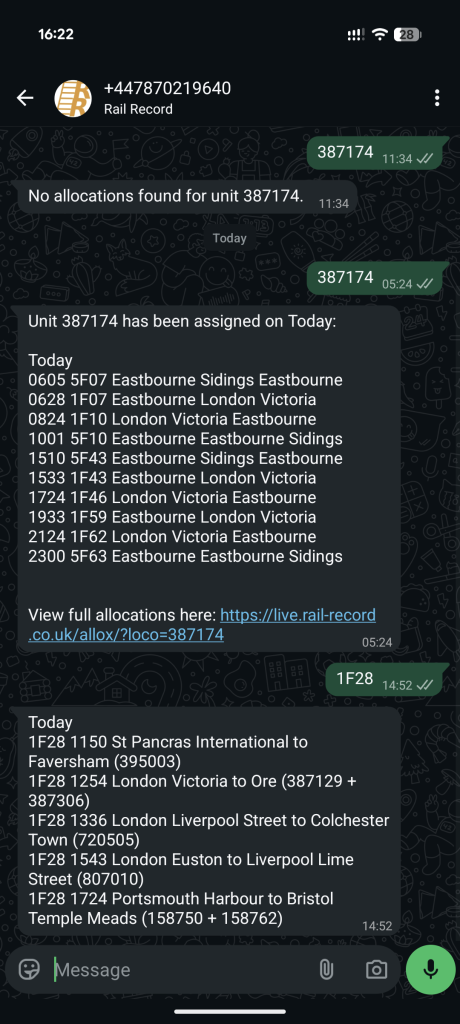
- Send the unit as a Whatsapp message to get that units workings for the rest of the day.
- Send the headcode as a Whatsapp message to get a list of services using that headcode and their assignments.
Send to 07870219640 and you will receive allocations for the current day. If no workings are assigned, you will receive a message saying so.
Send Requests by SMS (Text)
Sending a text message to X to receive information about train assignment. Do not confuse this number with the Whatsapp number.
Supports:
- Individual Unit Request (eg 387174)
- Headcode Request (eg 2C28)
How to Use:
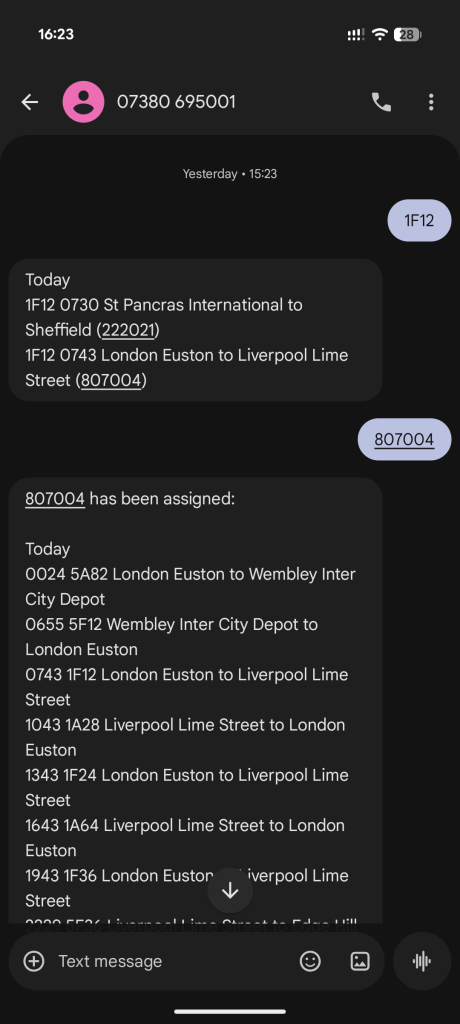
- Send the unit as an SMS message to get full allocation workings for that day at the time of request.
- Send the headcode as an SMS message to get list of workings using that headcode, and their unit assignments.
Send to 07380 695001 and you will receive the allocations by SMS.
Screenshots of Example Results
Some demo results that show what can be expected from a request.
Below: A Whatsapp response to a single class unit and a headcode request.
Below: An SMS request in the same manner.
Inbound Allocation Alerts FAQ
How can I get a list of a train's workings for the current day?
This can be achieved in a number of ways. For email, by sending one or more unit numbers in the subject line of an email to units@gen.rail-record.co.uk. For SMS, by texting the unit number to 07380695001, or for Whatsapp, by texting the unit number to 07870219640.
Is it free to request allocations by email, SMS and Whatsapp?
Email it is free to request allocations. Whatsapp and SMS requests require a member area account which is a paid service.
How can I request full allocations by train class, eg class 458/5?
Email supports requesting full allocation output for a train fleet subclass such as 68/0 and 387/1 for example. The output is limited to 200 allocations. Consider a member area account for full fleet listings.
Can I request allocations by headcode?
SMS and Whatsapp requests let you receive allocations by headcode. For example texting 1F12 will give you a list of today's 1F12 services, whatever operators they may be, along with the unit allocation at the time of sending.
If a unit is not assigned, how can I get notified when it does get an allocation?
This is already part of the member area where you can set an alert for when the train is assigned to a future working. This can be a one off send, or you can set up recurring alerts every time the unit receives an allocation. Recurring alerts are email only.
I sent an SMS request but I didn't receive anything back?
For SMS, a reply is only sent if an allocation is found whereas Whatsapp will advise you if a train isn't out. If you do not receive anything, please make sure you have an active member area pro account. This is a paid service that costs money so a member account is needed to reimburse expenses.
How many allocation requests can I make?
There are no limits to the number of allocations you can request. However it is usually easier and quicker to use the live.rail-record.co.uk/allox allocations page where the dropdown instantly tells you if a unit is out.
If units can easily be looked up on the website, what is the point of this service?
Any requests for allocations made are stored on your device once received until deleted. Eg emails and Whatsapp messages. There can be several advantages to this, such as having the allocations offline where a data connection may not be available. This may also be advantageous for anyone who wants to track down a particular train's workings in a simple, easy to read format. Furthermore this service can therefore be used on mobile devices that aren't capable of browsing the internet.
To get to Train Allocations Lookup just used to type into Google and would come up.
Not very good at anything involving IT but now comes up to RTT, Have worked out
how to get to the page I want but just wonder if I have inadvertently messed something up.?
Hi John
Hopefully this is okay now? I think Google was blocked from accessing Railrecord for a short time earlier this month which meant it may have dropped out of search results.
Kind Regards